Website for Contractors - Content That Brings Inquiries
Learn what content a contractor website needs to generate inquiries - from hero section to contact form.
Many contractor businesses invest in a website and wonder why hardly any inquiries come in. In practice, it’s rarely about “design,” but almost always about content: What does a potential customer see in the first 10 seconds, do they immediately understand your offering, and do they get enough trust to actually call or submit the form?
This guide shows you what content a website for contractors needs so that it not only looks good, but measurably brings inquiries. Focus: local clientele in Switzerland, quick decision paths, and a site optimized for conversion.
What a Website for Contractors Must Deliver (So Inquiries Happen)
When it comes to contractor services, people usually don’t search “sometime,” but when there’s a concrete problem: quote for a renovation, broken heating, new kitchen, painting before moving in. Your website should therefore deliver three things very quickly:
- Clarity: What exactly do you do, for whom, in which region?
- Trust: Why you specifically? Evidence, not claims.
- Next step: Contact in 1 click, without hurdles.
If any of these is missing, prospects leave and click on the next business.
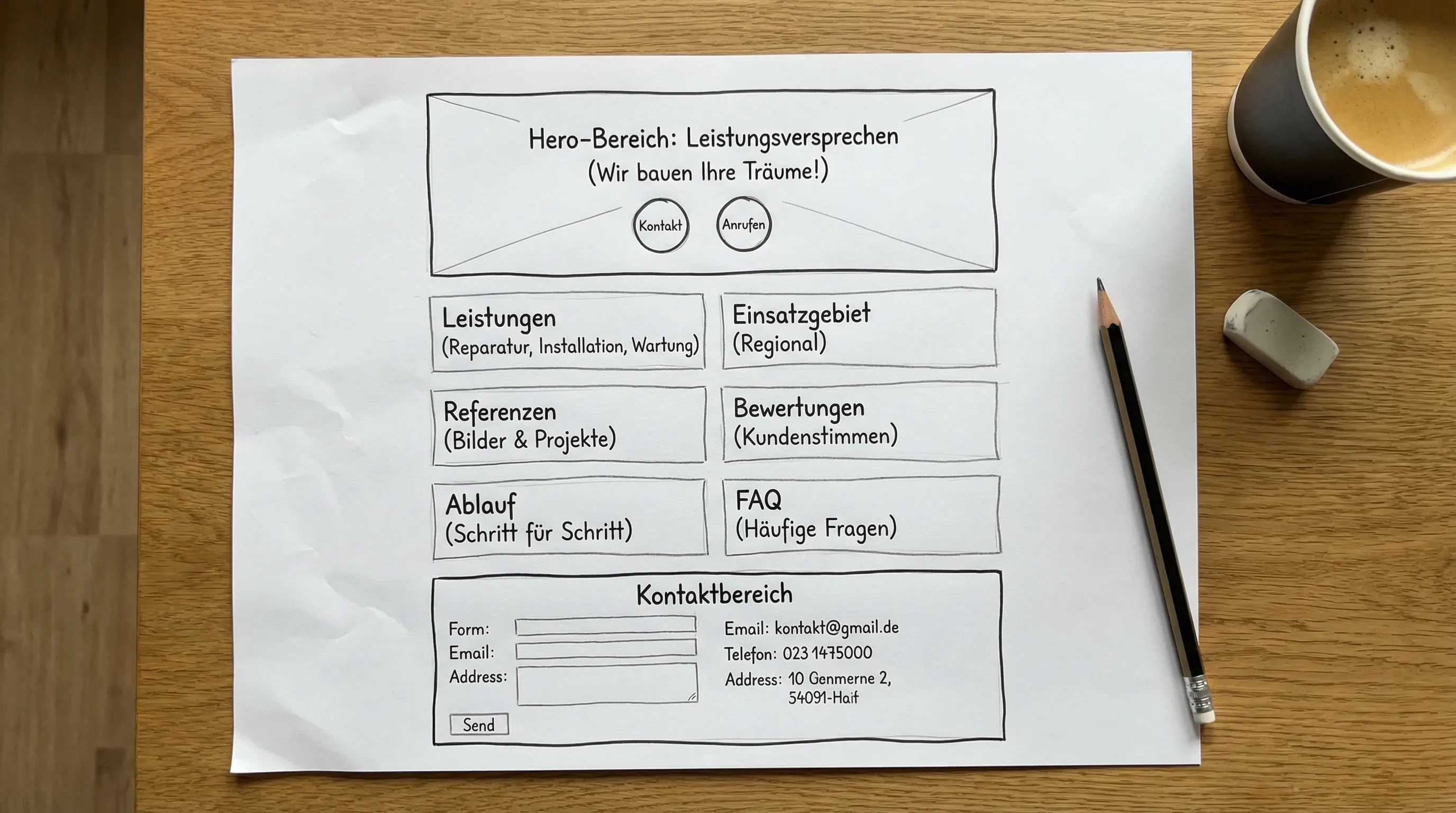
The Ideal One-Page Structure (for Local Contractor Businesses)
A one-page can work excellently when properly structured: It guides the visitor in a logical flow from “problem” to “contact.” This is especially effective when you want to be online quickly and prefer a lean website.
The following structure is proven in practice for many trades.
1) Hero Section: Your Offering in One Sentence + Immediate Contact
The hero section is the most important part of your website. It decides whether someone stays.
Must include:
- A clear service line with location reference
- 1 to 2 calls-to-action (e.g., “Request quote,” “Call”)
- Short arguments that reduce objections (e.g., response time, guarantee, “from the region”)
Example phrases (adapt):
- “Plumbing and heating in Zurich and surroundings, clean work, quick appointments.”
- “Painting work for apartments and single-family homes in Aargau, quote in 48 hours.”
Important: Avoid platitudes like “Quality at fair prices” without proof. Nobody believes that unless it’s backed up.
2) Services: Not “Everything,” but the Bookable Jobs
Many websites list trades like in a business directory. Better: Show specific, frequently requested services that a customer recognizes.
Instead of “Electrical installations,” rather:
- “Retrofit lights and outlets”
- “Check and modernize fuse box”
- “Wallbox installation”
This way you match search intent and increase the chance that someone thinks: “That’s exactly what I need.”
3) Service Area: Become Locally Visible (Without Keyword Stuffing)
For local inquiries, location reference is crucial. Keep it simple and honest:
- “Service area: City + surroundings, region, canton”
- Optional: important locations as a list, if you really work there
This helps not only users, but also search engines to assess your relevance. For local presence, a maintained Google Business Profile is also a central lever (address, hours, services, photos, reviews).
4) Trust: References, Photos, Reviews, Certificates
Contractor work is a matter of trust, because customers often can only judge the result after days or weeks. You therefore need “proof.”
Strong trust elements:
- Before-and-after photos or project gallery (real, not stock photos)
- Short case studies: initial situation, solution, duration
- Customer testimonials (with location or project type, if possible)
- Certificates, memberships, brands you work with (only genuine ones)
When using reviews, make sure they’re verifiable. The cleanest is linking to your review source (e.g., Google).
5) Process: What Happens After the Inquiry?
Many leave because they don’t know what happens next. A short process removes uncertainty.
Good content for this:
- “Send inquiry”
- “Short callback for clarification”
- “Site visit / measurements” (if relevant)
- “Quote”
- “Execution + handover”
Keep it short and concrete. The clearer the process, the more likely the inquiry.
6) Prices: Give Orientation Without Getting Burned
“What does it cost?” is one of the most common questions. If you say nothing at all, you lose price-sensitive but perfectly good customers.
You don’t have to promise fixed prices. What works well:
- Approximate prices for typical work (“from,” “depending on scope”)
- Explanation of what the price depends on
- Note about free or paid site visit (only if true)
The goal isn’t to calculate everything upfront, but to reduce friction.
7) Contact: As Few Hurdles as Possible
Seconds matter in the contact section. Make the next step extremely easy.
Best practices:
- Clickable phone number (especially important on mobile)
- Short form (name, phone or email, brief description)
- Hours or availability
- Optional: “Request callback” as a clear CTA
If you receive many inquiries via smartphone, “mobile-first” isn’t nice-to-have, it’s mandatory.
Which Content Brings the Most Inquiries in Practice?
Not every section has the same leverage. This overview helps set priorities.
| Content Element | Why It Increases Inquiries | Typical Mistakes |
|---|---|---|
| Clear value proposition in hero | Visitors immediately understand “am I in the right place?” | Generic phrases, no location reference |
| Concrete services (job-to-be-done) | Matches search intent and reduces follow-up questions | Too broad list without examples |
| References and real project photos | Proves competence, reduces risk | Stock images, no details |
| Customer reviews | Social proof works strongly for local services | Outdated or unbelievable quotes |
| Process in 3 to 5 steps | Removes uncertainty, increases contact rate | Too long, too technical |
| Contact in 1 click | Lowers barrier for quick decisions | Hidden form, no phone |
Conversion Copy: 7 Phrases That Work for Contractors
You don’t have to “sell,” but you should guide clearly. Here are text modules as inspiration:
- “Request quote (response within…)” (only state if realistic)
- “Free initial consultation” (only if you actually offer it)
- “Clean handover and transparent quote”
- “On schedule, even for urgent repairs” (only if you cover emergencies)
- “Work in occupied apartments, low-dust and tidy”
- “Fixed contact person”
- “Serving the… region”
The most important point: Write like your customers speak, not like a brochure.
SEO Basics for a Contractor Website (Without Tech Overload)
A website can have the best content, but if it’s technically slow or search engines can’t categorize it well, you lose potential.
What matters most for a lean one-page:
Local Relevance
- Location reference in title, headings, and text (natural, not overdone)
- Consistent company data (name, address, phone) on website and Google Business Profile
Clean Structure
- One clear H1 (e.g., “Painter in Winterthur”)
- Logical H2 sections (services, references, contact)
Speed and Mobile-Friendliness
Google has emphasized for years the importance of user-friendly pages, especially mobile. The Core Web Vitals in Google documentation provide orientation.
If you make content “heavy” (huge images, too many effects), it costs inquiries because users leave.
Structured Data (When Appropriate)
For local businesses, structured markup can help understand information better. It’s not a must, but a plus when implemented correctly.
Mini Checklist: Your Website Is Inquiry-Ready When…
You can use this list 1:1 for quality assurance:
- In the first screen it’s clear: service + region + CTA
- Phone number is clickable, contact is never “far away”
- Services are concretely described, not just categories
- There are real images, references, or projects
- Reviews or customer testimonials are visible
- Process after inquiry is explained
- Hours or availability are stated
- Page loads fast and is well usable on mobile
Frequently Asked Questions (FAQ)
What content does a contractor website need at minimum?
A clear value proposition (with region), concrete services, references or reviews, a short process, and an extremely simple contact section.
Is a one-page website enough for a contractor business?
In many cases yes, especially for local businesses with clear services. The structure is key: hero, services, trust, process, contact. If you cover many different trades or locations, a multi-page structure can make sense.
Should I mention prices on the website?
If possible, at least give orientation (e.g., “from” prices or typical price ranges). This reduces bounces and filters unsuitable inquiries without having to promise fixed prices.
How do I get more local inquiries through Google?
Combine a clean website with a maintained Google Business Profile, consistent contact data, and real reviews. Add location references to your content without artificially overdoing it.
What are the most common mistakes on contractor websites?
Unclear services, no trust evidence (projects, reviews), hidden contact options, slow loading times, and texts without location reference.
Website That Brings Inquiries (Without a Months-Long Project)
If you want a website for contractors that goes online quickly, is strong on mobile, and is optimized for inquiries, Web Alpine Studio is happy to help: A one-page website costs CHF 790 one-time, a complete website with up to 10 subpages CHF 1’790, each plus CHF 29 per month hosting including SSL, backups, and updates.
You’ll find all packages transparently on our pricing page, or contact us directly for a no-obligation consultation.